Installation & Setup
Learn about our install and setup process, and get started with ease.
Fibre Fibre
Fibre How much will it cost to set up fibre?
- Chorus ONT install: Free
Within 200 meters of the nearest fibre point, a Chorus ONT can be installed for free. - Buy our router: $90 (including delivery)
For the smoothest experience, we recommended buying our pre-configured Vilo 6 router. - Bring your own router: Free You can use your own router, but you must configure it yourself for a Static IP Address and we will not be able to assist with problems beyond the Chorus ONT.
A prepayment is required to cover costs and secure commitment. This includes the first month of service and any router delivery (if chosen), and protects us if an application is cancelled. The amount depends on your chosen plan and will be confirmed at signup.
Fibre How do I set up my new Vilo router?
- Using an ethernet cable, connect the Chorus ONT to your Vilo router from LAN1 (or GE1) to WAN/LAN. For the best performance, use a cable labelled Cat5e or Cat6 that has connectors with a secure clip.
- Wait for the light on your router to turn blue (Vilo 5) or white (Vilo 6).
Port labels may differ depending on your Chorus ONT type.
For a smoother install, we recommend using a surge protector multi-plug with sufficient cable length to ensure safe and flexible placement of your equipment. This helps protect your router from power surges and ensures an optimal setup.
If you are opting to use your own router, read our BYO Router section for more information.
Fibre What is the Chorus ONT install process?
These steps apply if you don't have a Chorus ONT installed at your property. Since this process involves scheduling, there will be a lead time depending on Chorus technician availability.
- Signup online for fibre
- We'll submit an install job to Chorus.
In some circumstances, such as shared driveways and apartments, a job may need to follow Chorus' consent process. - When consent is not required, or has been successfully gained, we'll schedule a Chorus technician to visit your property.
If your property already has a Chorus ONT, your connection is ready to be activated, all you need is our router.
Fibre Can I get a Chorus ONT installed if I’m renting?
To install a Chorus ONT when you’re not the property owner, you must obtain the owner’s consent. The Chorus technician will ask you to sign an End User Agreement, and will discuss the proposed install approach so it meets both the technical requirements and your preferences.
Fibre Do I need to be home for a Chorus ONT install?
Yes, someone over 18 needs to be home to allow the Chorus technician access to your property and to make decisions regarding the install. The technician will visit to propose how they'll run fibre from the street into the house. While the technician will provide guidance, the install approach will be discussed and agreed upon collaboratively, ensuring it meets your preferences and requirements.
Rural Wireless Rural Wireless
Rural Wireless How much will it cost to set up rural wireless?
If our technician does a site visit for a signal test and we cannot connect you, there is no cost.
We will charge you $100 for a signal test if our technician completes a site visit and confirms a good signal but you decide not to continue with install and thus withdraw your application for a wireless connection.
Standard installation is free, including the technician visit, antenna, and cabling. You only pay for your router ($75). If your installation requires any extra work beyond standard setup, we'll confirm any additional costs with you in advance.
Rural Wireless What is the rural wireless install process?
Our lead time for installs is up to 2 weeks as our technicians need to schedule around weekday availability, weather conditions, and travel schedules.
- Signup online for rural wireless
- We'll use geospatial software to remotely check line-of-sight for your location
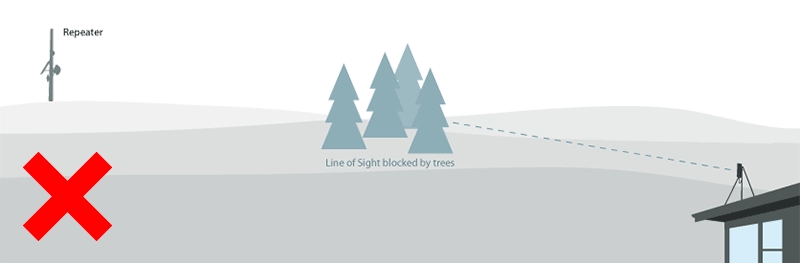
- If our line-of-sight check is inconclusive (e.g. property is surrounded by large trees) our local technician will arrange a visit for signal testing
- If our line-of-sight check shows your location is not in our coverage areas or it is clearly obscured, we won't be able to connect you
- If our line-of-sight check or in-person signal test passes, our local technician will install the necessary equipment and get you connected
Rural Wireless What do you mean by 'line-of-sight'?
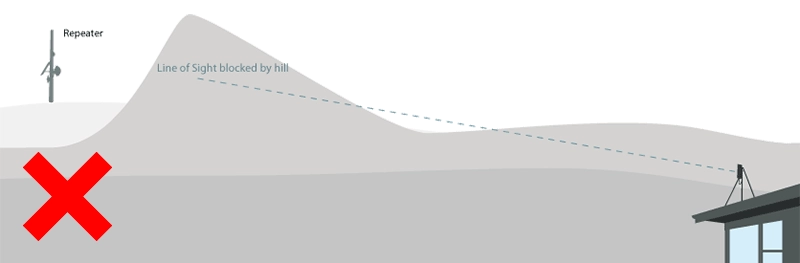
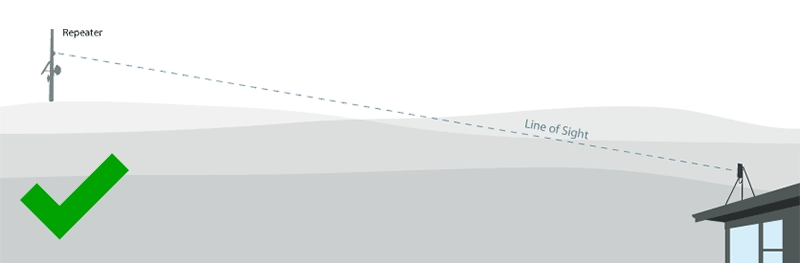
To access our rural wireless services, your house must be within line-of-sight of one of our long-range wireless repeaters. We can only confirm this on a case-by-case basis and in some cases this will require a visit to your property by one of our local technicians.
Rural Wireless What will the wireless equipment look like on my property?
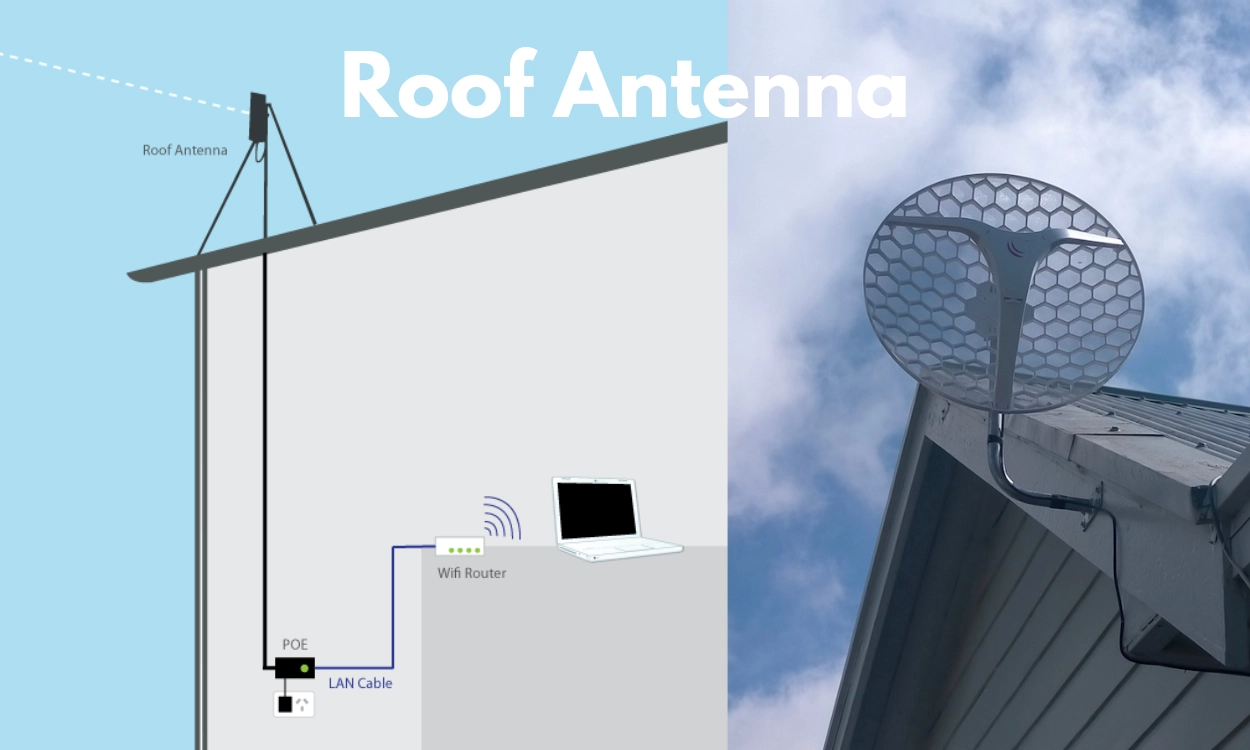
To receive the signal ommitted by our repeaters, we will need to install an antenna on the roof of your house (like a sky dish but smaller). A cable is run into your house; it normally comes up under your floor and into an area that has access to a power plug. We then leave a WiFi router that beams internet around your house for various devices.
Rural Wireless Do I need a router?
No. You don't need a WiFi router to access the internet from your roof antenna. Your computer can still be connected via cable. But if you have multiple devices (especially mobile phones) it is recommended that you set up WiFi access within your home.
Got more questions? Get in touch.